> ## Documentation Index
> Fetch the complete documentation index at: https://docs.pingtree.com/llms.txt
> Use this file to discover all available pages before exploring further.
# Data Overview
> View, filter, and export real-time click and form data for your campaigns.
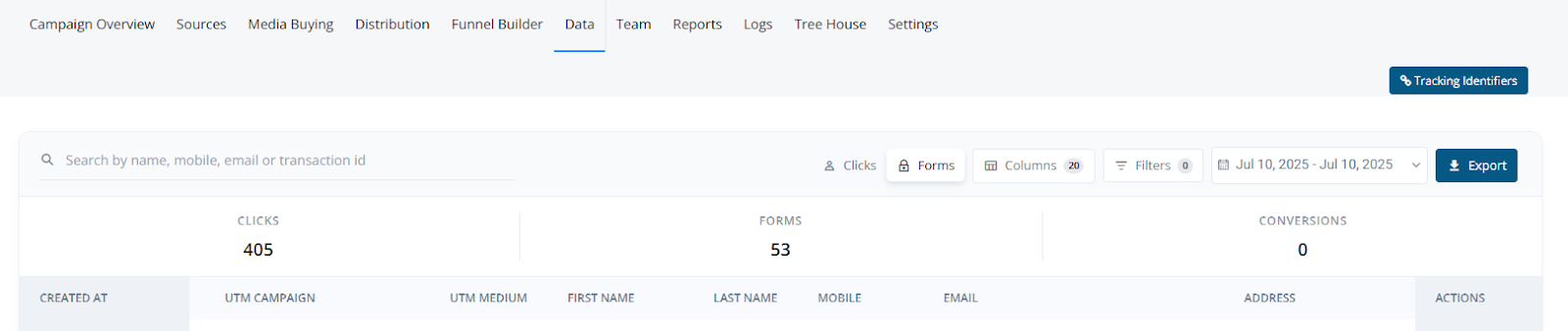
The Data tab surfaces every click and form event flowing through a campaign in real time. It acts as a living ledger: users can search, filter, export, or take row-level actions without leaving the page. The layout mirrors other Pingtree modules, providing a familiar experience.
 **Elements & Features**
1. **Global Search**\
Instantly narrow results by typing name, mobile, email, or transaction ID.
2. **Headline Counters**\
Real-time totals for Clicks, Forms, and Conversions. Adjust dynamically with filters.
3. **View Toggle (Clicks / Forms)**\
Switch between raw click events and completed form submissions.
4. **Columns Button**\
Open a side drawer to toggle visibility and re-order fields. Save views for later use.
5. **Filters Button**\
Launches a panel with preset dropdowns (Source, Advertiser, Events) and a custom builder using key ▸ operator ▸ value logic.
6. **Date Range Picker**\
Choose from relative (e.g., Today, Last 7 Days) or absolute date ranges. Campaign timezone is respected.
7. **Export Button**\
Generates a CSV export (max 100,000 rows) using applied filters. Delivered via in-app notification and email.
8. **Results Grid**\
A fully virtualized, infinite-scroll table with live refresh.
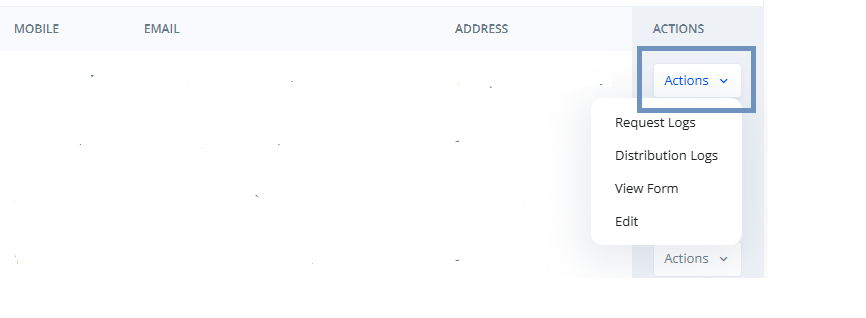
9. **Row Actions Menu**\
Context-specific actions like:
* Request Logs: View full request/response JSON
* Distribution Logs: Clone form for routing test
* View Form
* Edit
**Elements & Features**
1. **Global Search**\
Instantly narrow results by typing name, mobile, email, or transaction ID.
2. **Headline Counters**\
Real-time totals for Clicks, Forms, and Conversions. Adjust dynamically with filters.
3. **View Toggle (Clicks / Forms)**\
Switch between raw click events and completed form submissions.
4. **Columns Button**\
Open a side drawer to toggle visibility and re-order fields. Save views for later use.
5. **Filters Button**\
Launches a panel with preset dropdowns (Source, Advertiser, Events) and a custom builder using key ▸ operator ▸ value logic.
6. **Date Range Picker**\
Choose from relative (e.g., Today, Last 7 Days) or absolute date ranges. Campaign timezone is respected.
7. **Export Button**\
Generates a CSV export (max 100,000 rows) using applied filters. Delivered via in-app notification and email.
8. **Results Grid**\
A fully virtualized, infinite-scroll table with live refresh.
9. **Row Actions Menu**\
Context-specific actions like:
* Request Logs: View full request/response JSON
* Distribution Logs: Clone form for routing test
* View Form
* Edit
 **Working with the Grid**
* **Clicks vs Forms View**\
Clicks show every inbound event, even if the form was not completed.\
Forms represent completed submissions (collapsed across multiple clicks).
**Working with the Grid**
* **Clicks vs Forms View**\
Clicks show every inbound event, even if the form was not completed.\
Forms represent completed submissions (collapsed across multiple clicks).
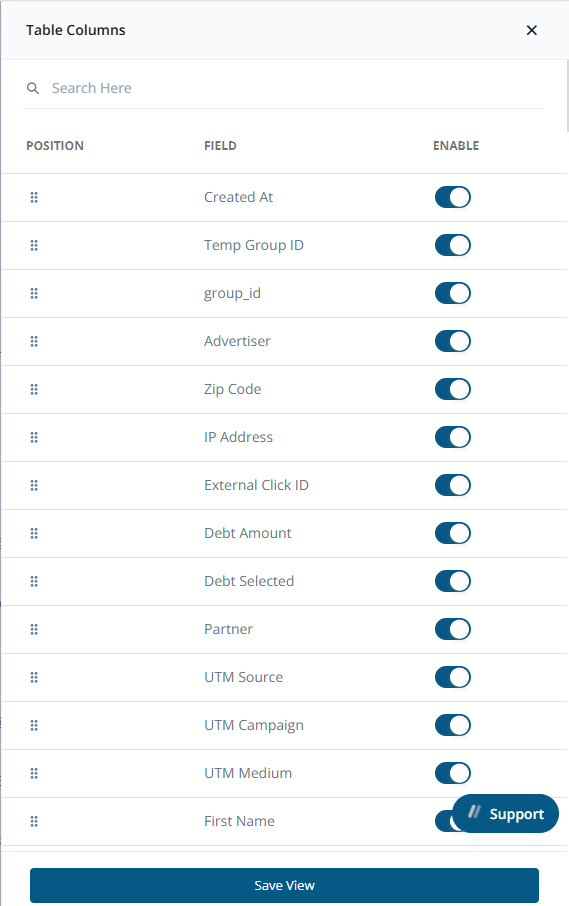
 * **Choosing Columns**\
Click the Columns button to toggle visibility or re-order fields.\
Save View stores your layout for future sessions.
* **Date Range Picker**\
Defaults to the last 30 days. Use presets or define a custom start–end range.\
Click Apply to refresh or Clear to reset.
* **Choosing Columns**\
Click the Columns button to toggle visibility or re-order fields.\
Save View stores your layout for future sessions.
* **Date Range Picker**\
Defaults to the last 30 days. Use presets or define a custom start–end range.\
Click Apply to refresh or Clear to reset.
 * **Exporting**\
CSV exports use UTF-8 encoding and reflect currently visible columns.\
Limit: 100,000 rows. Use filters to narrow results.\
Download links are sent via notification and email.
* **Filtering Data**
* **Exporting**\
CSV exports use UTF-8 encoding and reflect currently visible columns.\
Limit: 100,000 rows. Use filters to narrow results.\
Download links are sent via notification and email.
* **Filtering Data**
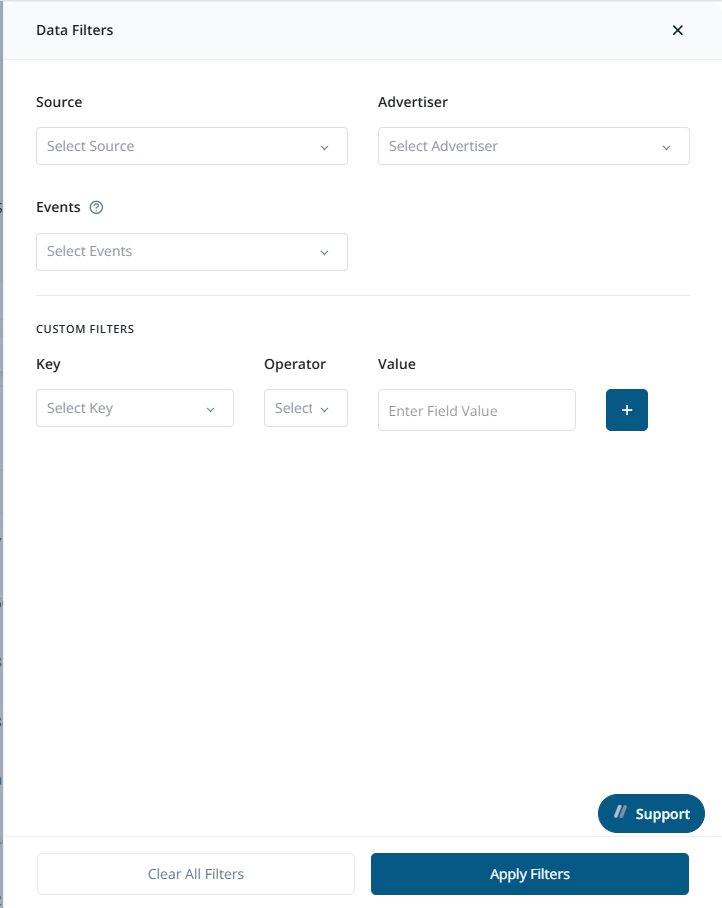 | Filter Type | Behavior |
| ---------------- | -------------------------------------------------------------------------------- |
| Preset dropdowns | Multi-select chips for Source, Advertiser, and Events |
| Custom Filters | Use key/operator/value logic with support for text, numeric, and date conditions |
| Reset | Click "Clear All Filters" to wipe filters without refreshing the page |
**Common Workflows**
* **Quick Audit**
* Switch to Forms view
* Set Date Range to "Yesterday"
* Open Filters → Events = Base Click Sold
* Review data or Export for compliance checks
* **Creating a Custom View**
* Enable relevant columns
* Rearrange using drag-and-drop
* Save View (e.g., “Buyer QA”)
* Automatically reloads next visit
**Permissions & Visibility**
| Role | Capabilities |
| --------- | ------------------------------------ |
| Admin | Full access to all actions |
| Buyer | Read-only access to their leads only |
| Affiliate | Clicks view only, no export access |
**Best Practices**
* Save different views for QA, Compliance, and Finance to streamline workflows
* Limit exports to under 100k rows to prevent timeouts; split larger data pulls into monthly chunks
| Filter Type | Behavior |
| ---------------- | -------------------------------------------------------------------------------- |
| Preset dropdowns | Multi-select chips for Source, Advertiser, and Events |
| Custom Filters | Use key/operator/value logic with support for text, numeric, and date conditions |
| Reset | Click "Clear All Filters" to wipe filters without refreshing the page |
**Common Workflows**
* **Quick Audit**
* Switch to Forms view
* Set Date Range to "Yesterday"
* Open Filters → Events = Base Click Sold
* Review data or Export for compliance checks
* **Creating a Custom View**
* Enable relevant columns
* Rearrange using drag-and-drop
* Save View (e.g., “Buyer QA”)
* Automatically reloads next visit
**Permissions & Visibility**
| Role | Capabilities |
| --------- | ------------------------------------ |
| Admin | Full access to all actions |
| Buyer | Read-only access to their leads only |
| Affiliate | Clicks view only, no export access |
**Best Practices**
* Save different views for QA, Compliance, and Finance to streamline workflows
* Limit exports to under 100k rows to prevent timeouts; split larger data pulls into monthly chunks