> ## Documentation Index
> Fetch the complete documentation index at: https://docs.pingtree.com/llms.txt
> Use this file to discover all available pages before exploring further.
# Data Transformer
> Define Pingtree’s field mapping data transformer and various use-cases.
# Data Transformer
## What is a Data Transformer?
Pingtree’s data transformer refers to a mechanism or process used to manipulate or transform data between different formats, structures, or systems. Specifically, in field mapping for lead generation, a data transformer ensures that data collected from lead forms or other sources is transformed and mapped accurately to the desired fields in a database, CRM system, or other destination.
For example: In certain verticals, buyers may only accept values in a particular case-sensitive format. If your form question "Do you own the home?" returns “yes” or “no,” but the buyer only accepts “Own” or “Rent,” Pingtree’s data transformer can convert “yes” to “Own” and “no” to “Rent.”
## Applying the Data Transformer
The data transformer is applied within a given endpoint in the **Lead Routing** section:
1. Click the **+** icon next to the field mapping.
2. A transformer UI appears below the field.
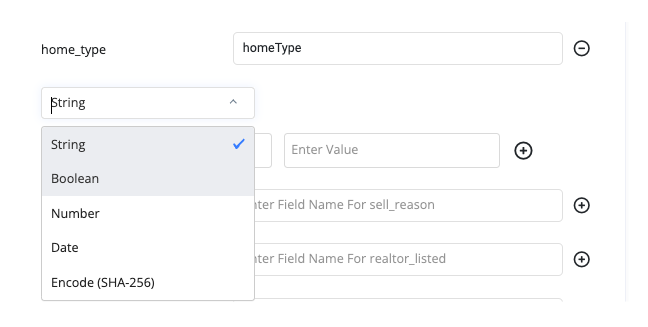
3. Your source field (e.g., `home_type`) appears on the left; the target field (e.g., `homeType`) is on the right.
4. Choose the **Data Type** (String, Number, Date).
5. Map each source value to its transformed target value in the table.
6. Click **Submit** to save the transformations.

 ## Using the Data Transformer for Date Formatting
Date fields require a preset mask in your form builder (Webflow 2.0):
* **DD-MM-YYYY**
* **MM/DD/YYYY**
* **YYYY-MM-DD**
In the transformer tool, select **Date** as the data type, then choose one of:
* **ISO 8601**
* **Short Date**
* **Unix Timestamp**
* **Custom Format**: Enter your own format string.
### Common Custom Formats
| Transformed Value Result | Date Format in Enter Custom Value |
| ----------------------------------- | --------------------------------- |
| 2021 | YYYY |
| 202108 | YYYYMM |
| 2021-08 | YYYY-MM |
| 8/5 | M/D |
| 08/05 | MM/DD |
| 20210805 | YYYYMMDD |
| 2021-08-05 | YYYY-MM-DD |
| 2021\_08\_05 | YYYY\_MM\_DD |
| 2021.08.05 | YYYY.MM.DD |
| 8/5/21 | M/D/YY |
| 08/05/21 | MM/DD/YY |
| 08/05/2021 | MM/DD/YYYY |
| 05 Aug 21 | DD MMM YY |
| 05 Aug 2021 | DD MMM YYYY |
| 05 August 2021 | DD MMMM YYYY |
| Aug 5, 21 | MMM D, YY |
| Aug 5, 2021 | MMM D, YYYY |
| Aug 05, 2021 | MMM DD, YYYY |
| August 5, 2021 | MMMM D, YYYY |
| August 05, 2021 | MMMM DD, YYYY |
| 202108051315 | YYYYMMDDHHmm |
| 20210805\_1315 | YYYYMMDD\_HHmm |
| 2021.08.05.1315 | YYYY.MM.DD.HHmm |
| 2021-08-05-1315 | YYYY-MM-DD-HHmm |
| 2021-08-05\_1315 | YYYY-MM-DD\_HHmm |
| 2021.08.05.13.15 | YYYY.MM.DD.HH.mm |
| 2021-08-05-13-15 | YYYY-MM-DD-HH-mm |
| 2021-08-05 13:15 | YYYY-MM-DD HH:mm |
| 2021-08-05 1:15 PM | YYYY-MM-DD h:mm A |
| 2021-08-05 01:15 PM | YYYY-MM-DD hh:mm A |
| 2021-08-05 @ 1:15 PM | YYYY-MM-DD @ h:mm A |
| 20210805131504 | YYYYMMDDHHmmss |
| 2021.08.05.131504 | YYYY.MM.DD.HHmmss |
| 2021-08-05-131504 | YYYY-MM-DD-HHmmss |
| 2021-08-05\_131504 | YYYY-MM-DD\_HHmmss |
| 2021-08-05\_1315.04 | YYYY-MM-DD\_HHmm.ss |
| 2021.08.05.13.15.04 | YYYY.MM.DD.HH.mm.ss |
| 2021-08-05-13-15-04 | YYYY-MM-DD-HH-mm-ss |
| 2021-08-05 13:15:04 | YYYY-MM-DD HH:mm:ss |
| 2021-08-05 13:15.04 | YYYY-MM-DD HH:mm.ss |
| 2021-08-05 1:15:04 PM | YYYY-MM-DD h:mm:ss A |
| 2021-08-05 01:15:04 PM | YYYY-MM-DD hh:mm:ss A |
| 2021-08-05 @ 1:15:04 PM | YYYY-MM-DD @ h:mm:ss A |
| We Aug 5 21 | dd MMM D YY |
| Wed Aug 5 21 | ddd MMM D YY |
| Wed Aug 5 2021 | ddd MMM D YYYY |
| Wed Aug 05 2021 | ddd MMM DD YYYY |
| Wednesday, Aug 5 2021 | dddd, MMM D YYYY |
| Wednesday, August 5, 2021 | dddd, MMMM D, YYYY |
| Wednesday, August 05, 2021 | dddd, MMMM DD, YYYY |
| 1:15 PM | h:mm A |
| 01:15 PM | hh:mm A |
| @ 1:15 PM | @ h:mm A |
| Wed Aug 5 21 1:15 PM | ddd MMM D YY h:mm A |
| Wed Aug 5 2021 1:15 PM | ddd MMM D YYYY h:mm A |
| Wed Aug 05 2021 1:15 PM | ddd MMM DD YYYY h:mm A |
| Wednesday, Aug 5 2021 1:15 PM | dddd, MMM D YYYY h:mm A |
| Wednesday, August 5, 2021 1:15 PM | dddd, MMMM D, YYYY h:mm A |
| Wednesday, August 05, 2021 1:15 PM | dddd, MMMM DD, YYYY h:mm A |
| Wed Aug 5 21 01:15 PM | ddd MMM D YY hh:mm A |
| Wed Aug 5 2021 01:15 PM | ddd MMM D YYYY hh:mm A |
| Wed Aug 05 2021 01:15 PM | ddd MMM DD YYYY hh:mm A |
| Wednesday, Aug 5 2021 01:15 PM | dddd, MMM D YYYY hh:mm A |
| Wednesday, August 5, 2021 01:15 PM | dddd, MMMM D, YYYY hh:mm A |
| Wednesday, August 05, 2021 01:15 PM | dddd, MMMM DD, YYYY hh:mm A |
| Wed Aug 5 21 @ 1:15 PM | ddd MMM D YY @ h:mm A |
| Wed Aug 5 2021 @ 1:15 PM | ddd MMM D YYYY @ h:mm A |
| Wed Aug 05 2021 @ 1:15 PM | ddd MMM DD YYYY @ h:mm A |
| Wednesday, Aug 5 2021 @ 1:15 PM | dddd, MMM D YYYY @ h:mm A |
## New Data Transformer Options
### String Sanitizer
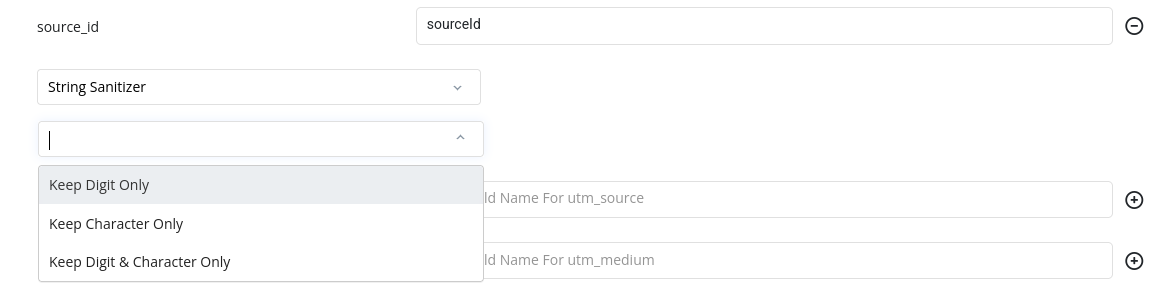
The String Sanitizer transformer tool allows users to manipulate the stored value to keep characters and numbers, and to remove special characters.
## Using the Data Transformer for Date Formatting
Date fields require a preset mask in your form builder (Webflow 2.0):
* **DD-MM-YYYY**
* **MM/DD/YYYY**
* **YYYY-MM-DD**
In the transformer tool, select **Date** as the data type, then choose one of:
* **ISO 8601**
* **Short Date**
* **Unix Timestamp**
* **Custom Format**: Enter your own format string.
### Common Custom Formats
| Transformed Value Result | Date Format in Enter Custom Value |
| ----------------------------------- | --------------------------------- |
| 2021 | YYYY |
| 202108 | YYYYMM |
| 2021-08 | YYYY-MM |
| 8/5 | M/D |
| 08/05 | MM/DD |
| 20210805 | YYYYMMDD |
| 2021-08-05 | YYYY-MM-DD |
| 2021\_08\_05 | YYYY\_MM\_DD |
| 2021.08.05 | YYYY.MM.DD |
| 8/5/21 | M/D/YY |
| 08/05/21 | MM/DD/YY |
| 08/05/2021 | MM/DD/YYYY |
| 05 Aug 21 | DD MMM YY |
| 05 Aug 2021 | DD MMM YYYY |
| 05 August 2021 | DD MMMM YYYY |
| Aug 5, 21 | MMM D, YY |
| Aug 5, 2021 | MMM D, YYYY |
| Aug 05, 2021 | MMM DD, YYYY |
| August 5, 2021 | MMMM D, YYYY |
| August 05, 2021 | MMMM DD, YYYY |
| 202108051315 | YYYYMMDDHHmm |
| 20210805\_1315 | YYYYMMDD\_HHmm |
| 2021.08.05.1315 | YYYY.MM.DD.HHmm |
| 2021-08-05-1315 | YYYY-MM-DD-HHmm |
| 2021-08-05\_1315 | YYYY-MM-DD\_HHmm |
| 2021.08.05.13.15 | YYYY.MM.DD.HH.mm |
| 2021-08-05-13-15 | YYYY-MM-DD-HH-mm |
| 2021-08-05 13:15 | YYYY-MM-DD HH:mm |
| 2021-08-05 1:15 PM | YYYY-MM-DD h:mm A |
| 2021-08-05 01:15 PM | YYYY-MM-DD hh:mm A |
| 2021-08-05 @ 1:15 PM | YYYY-MM-DD @ h:mm A |
| 20210805131504 | YYYYMMDDHHmmss |
| 2021.08.05.131504 | YYYY.MM.DD.HHmmss |
| 2021-08-05-131504 | YYYY-MM-DD-HHmmss |
| 2021-08-05\_131504 | YYYY-MM-DD\_HHmmss |
| 2021-08-05\_1315.04 | YYYY-MM-DD\_HHmm.ss |
| 2021.08.05.13.15.04 | YYYY.MM.DD.HH.mm.ss |
| 2021-08-05-13-15-04 | YYYY-MM-DD-HH-mm-ss |
| 2021-08-05 13:15:04 | YYYY-MM-DD HH:mm:ss |
| 2021-08-05 13:15.04 | YYYY-MM-DD HH:mm.ss |
| 2021-08-05 1:15:04 PM | YYYY-MM-DD h:mm:ss A |
| 2021-08-05 01:15:04 PM | YYYY-MM-DD hh:mm:ss A |
| 2021-08-05 @ 1:15:04 PM | YYYY-MM-DD @ h:mm:ss A |
| We Aug 5 21 | dd MMM D YY |
| Wed Aug 5 21 | ddd MMM D YY |
| Wed Aug 5 2021 | ddd MMM D YYYY |
| Wed Aug 05 2021 | ddd MMM DD YYYY |
| Wednesday, Aug 5 2021 | dddd, MMM D YYYY |
| Wednesday, August 5, 2021 | dddd, MMMM D, YYYY |
| Wednesday, August 05, 2021 | dddd, MMMM DD, YYYY |
| 1:15 PM | h:mm A |
| 01:15 PM | hh:mm A |
| @ 1:15 PM | @ h:mm A |
| Wed Aug 5 21 1:15 PM | ddd MMM D YY h:mm A |
| Wed Aug 5 2021 1:15 PM | ddd MMM D YYYY h:mm A |
| Wed Aug 05 2021 1:15 PM | ddd MMM DD YYYY h:mm A |
| Wednesday, Aug 5 2021 1:15 PM | dddd, MMM D YYYY h:mm A |
| Wednesday, August 5, 2021 1:15 PM | dddd, MMMM D, YYYY h:mm A |
| Wednesday, August 05, 2021 1:15 PM | dddd, MMMM DD, YYYY h:mm A |
| Wed Aug 5 21 01:15 PM | ddd MMM D YY hh:mm A |
| Wed Aug 5 2021 01:15 PM | ddd MMM D YYYY hh:mm A |
| Wed Aug 05 2021 01:15 PM | ddd MMM DD YYYY hh:mm A |
| Wednesday, Aug 5 2021 01:15 PM | dddd, MMM D YYYY hh:mm A |
| Wednesday, August 5, 2021 01:15 PM | dddd, MMMM D, YYYY hh:mm A |
| Wednesday, August 05, 2021 01:15 PM | dddd, MMMM DD, YYYY hh:mm A |
| Wed Aug 5 21 @ 1:15 PM | ddd MMM D YY @ h:mm A |
| Wed Aug 5 2021 @ 1:15 PM | ddd MMM D YYYY @ h:mm A |
| Wed Aug 05 2021 @ 1:15 PM | ddd MMM DD YYYY @ h:mm A |
| Wednesday, Aug 5 2021 @ 1:15 PM | dddd, MMM D YYYY @ h:mm A |
## New Data Transformer Options
### String Sanitizer
The String Sanitizer transformer tool allows users to manipulate the stored value to keep characters and numbers, and to remove special characters.
 ### Prefix or Postfix
The Prefix or Postfix tool allows users to prepend or append strings to transformed values.\
**Example:** !\[REPLACE HERE: Prefix/Postfix UI]
### Prefix or Postfix
The Prefix or Postfix tool allows users to prepend or append strings to transformed values.\
**Example:** !\[REPLACE HERE: Prefix/Postfix UI]