> ## Documentation Index
> Fetch the complete documentation index at: https://docs.pingtree.com/llms.txt
> Use this file to discover all available pages before exploring further.
# Payout Settings
> Customize conversion-related payout logic including static payouts, rev-share, and advanced modifiers.
> **Note:** This tab is available in **Custom Source (CS)** and **Marketing Partner (MP)** source types.
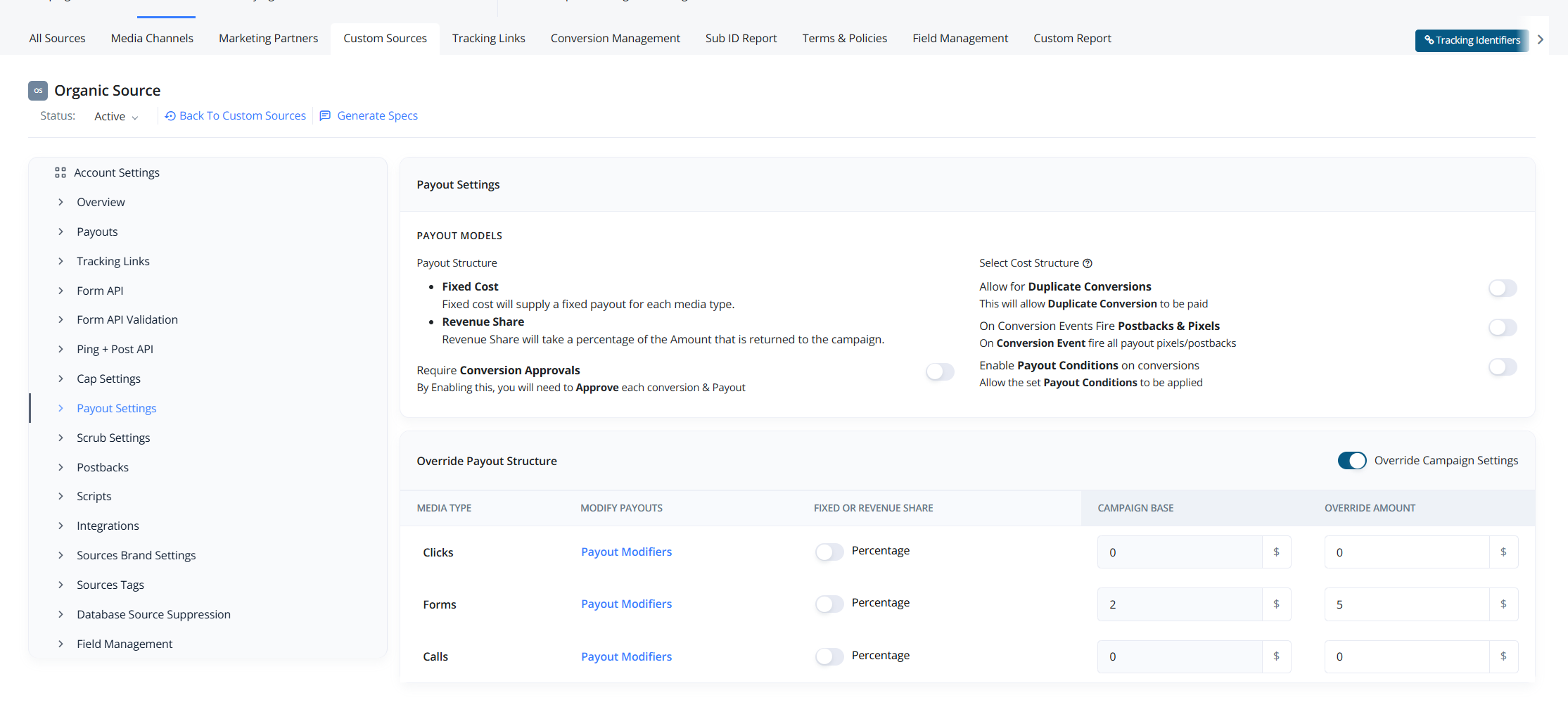
The **Payout Settings** tab provides full control over how payouts are handled for a specific source, allowing you to override campaign-level defaults and apply advanced dynamic payout structures.
 ## Payout Configuration Options
### First Card - Toggle Settings
The top section contains four toggle switches that modify how conversions and payouts are processed:
1. **Allow for Duplicate Conversions**
* When enabled, duplicate conversions will still be allowed and paid.
2. **On Conversion Events Fire Postbacks & Pixels**
* When enabled, payout-related postbacks and pixels will fire immediately upon a conversion event.
3. **Enable Payout Conditions on Conversions**
* Activates payout conditions based on rules set in the **Cap Settings** tab.
4. **Require Conversion Approvals**
* When enabled, each conversion must be manually approved before the payout is processed.
### Second Card - Default vs. Source-Level Overrides
The second section displays:
* **Default Payout Settings** configured at the **campaign level**.
* An option to **override** the campaign settings specifically for this source.
By overriding, you can apply a completely different payout structure customized for this traffic source.
## Lead Type Payout Structures
For each lead type — **Clicks**, **Calls**, and **Forms** — you can configure:
* **Static Amount**\
Set a fixed payout amount.
* **Revenue Share Percentage**\
Share a percentage of the revenue generated from the lead.
## Advanced Payout Modifier
Clicking on **Payout Modifier** for any lead type opens a slider for **advanced payout configuration**.
## Payout Configuration Options
### First Card - Toggle Settings
The top section contains four toggle switches that modify how conversions and payouts are processed:
1. **Allow for Duplicate Conversions**
* When enabled, duplicate conversions will still be allowed and paid.
2. **On Conversion Events Fire Postbacks & Pixels**
* When enabled, payout-related postbacks and pixels will fire immediately upon a conversion event.
3. **Enable Payout Conditions on Conversions**
* Activates payout conditions based on rules set in the **Cap Settings** tab.
4. **Require Conversion Approvals**
* When enabled, each conversion must be manually approved before the payout is processed.
### Second Card - Default vs. Source-Level Overrides
The second section displays:
* **Default Payout Settings** configured at the **campaign level**.
* An option to **override** the campaign settings specifically for this source.
By overriding, you can apply a completely different payout structure customized for this traffic source.
## Lead Type Payout Structures
For each lead type — **Clicks**, **Calls**, and **Forms** — you can configure:
* **Static Amount**\
Set a fixed payout amount.
* **Revenue Share Percentage**\
Share a percentage of the revenue generated from the lead.
## Advanced Payout Modifier
Clicking on **Payout Modifier** for any lead type opens a slider for **advanced payout configuration**.
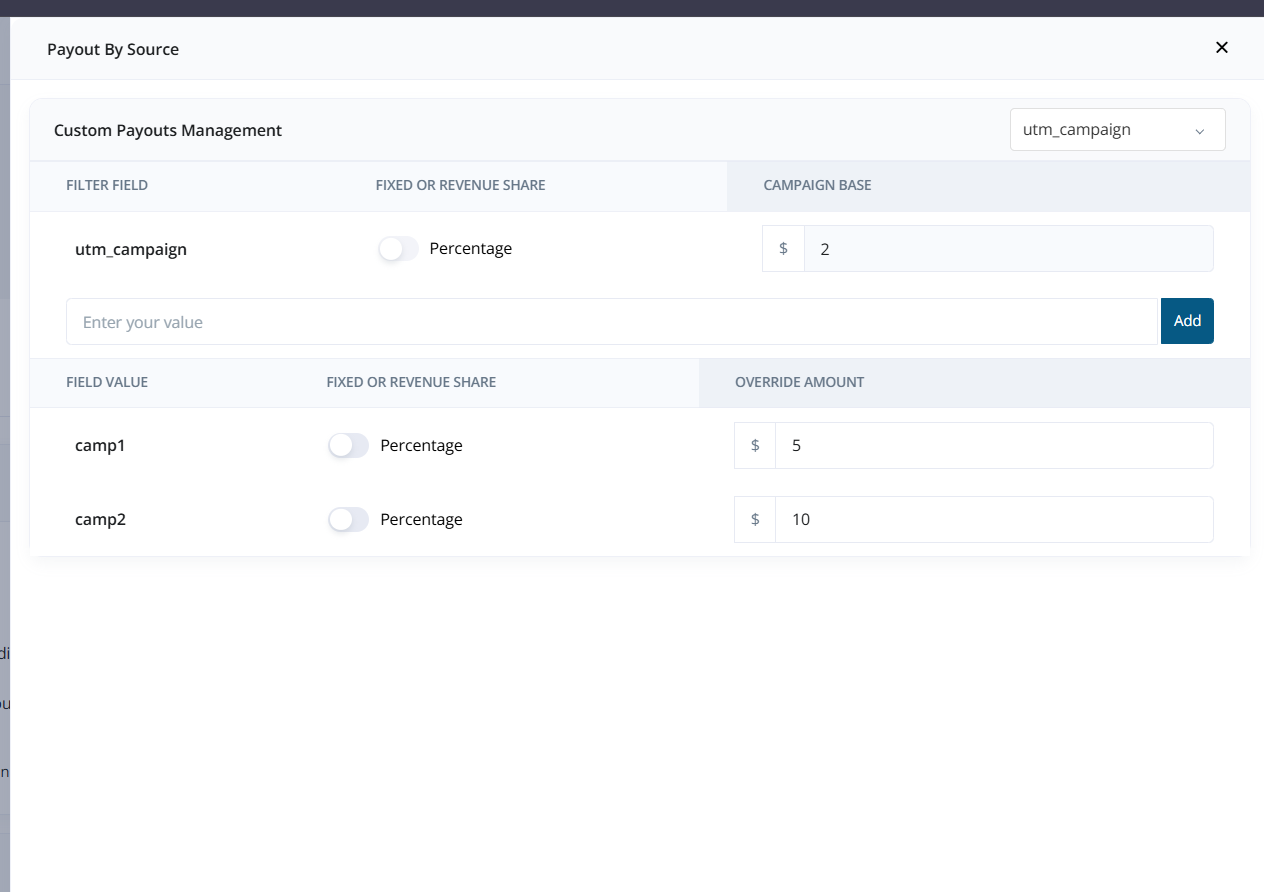 Within the modifier, you can define dynamic payout rules based on:
* **Buyer**
* **UTM parameters**
### Examples:
* If **Buyer A** buys the lead, payout **\$4**; if **Buyer B** buys, apply a **10% revenue share**.
* If the utm\_campaign is **camp1**, payout **$5**; if **camp2**, payout **$10**.
* Create dynamic payout structures for any field/value combination in the lead data.
This flexibility allows highly customized payout strategies to maximize your profitability and maintain tight control over acquisition costs.
***
## Additional Notes
### Allow for Duplicate Conversions
When **Allow for Duplicate Conversions** is enabled, the system will **permit multiple conversions for the same lead** and trigger the **payout multiple times**—one for each conversion event.
> Example: If a lead is sold to a buyer, and later that same lead is sold again via Click Listing or Offerwall, each of those conversions will **trigger a separate payout**.
Each conversion must be **manually approved** (if the "Require Conversion Approvals" toggle is enabled) before the payout is actually processed.
***
### Advanced Payout Modifier – Configuration Notes
Within the modifier, you can define dynamic payout rules based on:
* **Buyer**
* **UTM parameters**
### Examples:
* If **Buyer A** buys the lead, payout **\$4**; if **Buyer B** buys, apply a **10% revenue share**.
* If the utm\_campaign is **camp1**, payout **$5**; if **camp2**, payout **$10**.
* Create dynamic payout structures for any field/value combination in the lead data.
This flexibility allows highly customized payout strategies to maximize your profitability and maintain tight control over acquisition costs.
***
## Additional Notes
### Allow for Duplicate Conversions
When **Allow for Duplicate Conversions** is enabled, the system will **permit multiple conversions for the same lead** and trigger the **payout multiple times**—one for each conversion event.
> Example: If a lead is sold to a buyer, and later that same lead is sold again via Click Listing or Offerwall, each of those conversions will **trigger a separate payout**.
Each conversion must be **manually approved** (if the "Require Conversion Approvals" toggle is enabled) before the payout is actually processed.
***
### Advanced Payout Modifier – Configuration Notes
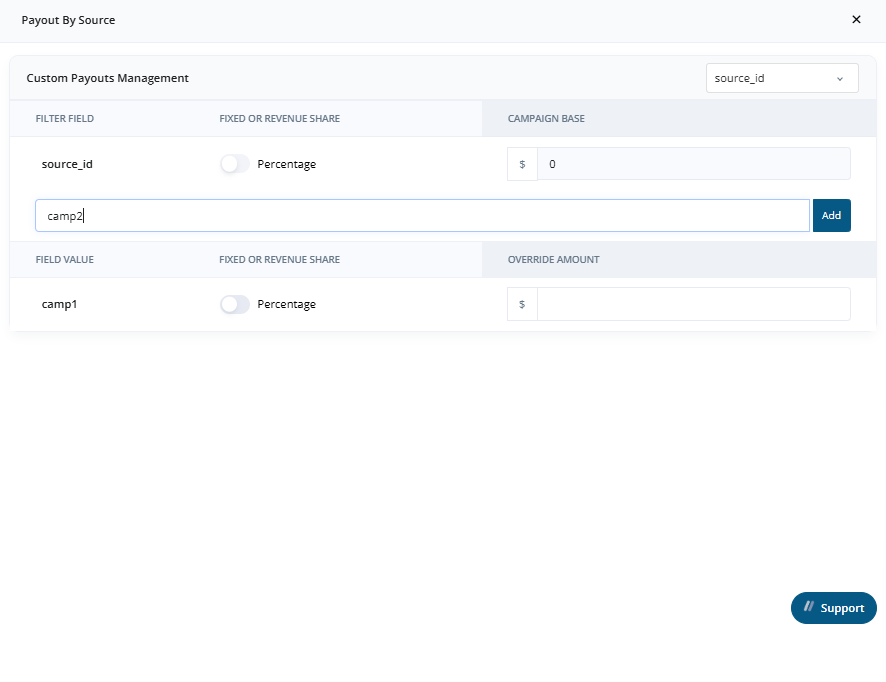 In the **Advanced Payout Modifier** section, you can define multiple dynamic payout rules by selecting parameters and their values.
1. **Select the Parameter**\
Use the dropdown on the top right to select the parameter you want to filter by (e.g., `source_id`, `utm_term`, `buyer_id`, etc.).
2. **Enter Values**\
Input one or more values and click **Add** to populate them in the **Field Value** list.
3. **Build Multi-Conditional Payout Logic**\
You can define **multiple parameters and values**, and the payout rules for each will be evaluated together.
#### Example Setup:
* `source_id`: `comp1`, `comp2`
* `utm_term`: `Tir1`, `Tir2`
> These payout rules will **coexist** and apply simultaneously, allowing granular, dynamic payout strategies that adapt based on lead data.
This setup gives you flexibility to structure payout behavior based on any combination of lead source or metadata.
***
* [Click here to view Custom Source Single View pages](./Custom-Source-Single-View)
* [Click here to view Marketing Partner Single View pages](./Marketing-Partner-Single-View)
* [Click here to view Media Channel Single View pages](./Media-Channel-Single-View)
In the **Advanced Payout Modifier** section, you can define multiple dynamic payout rules by selecting parameters and their values.
1. **Select the Parameter**\
Use the dropdown on the top right to select the parameter you want to filter by (e.g., `source_id`, `utm_term`, `buyer_id`, etc.).
2. **Enter Values**\
Input one or more values and click **Add** to populate them in the **Field Value** list.
3. **Build Multi-Conditional Payout Logic**\
You can define **multiple parameters and values**, and the payout rules for each will be evaluated together.
#### Example Setup:
* `source_id`: `comp1`, `comp2`
* `utm_term`: `Tir1`, `Tir2`
> These payout rules will **coexist** and apply simultaneously, allowing granular, dynamic payout strategies that adapt based on lead data.
This setup gives you flexibility to structure payout behavior based on any combination of lead source or metadata.
***
* [Click here to view Custom Source Single View pages](./Custom-Source-Single-View)
* [Click here to view Marketing Partner Single View pages](./Marketing-Partner-Single-View)
* [Click here to view Media Channel Single View pages](./Media-Channel-Single-View)