> ## Documentation Index
> Fetch the complete documentation index at: https://docs.pingtree.com/llms.txt
> Use this file to discover all available pages before exploring further.
# Facebook Enhanced Conversions
> How to send event-level conversions to Facebook with hashed user data, fbp/fbc tracking, and multi-buyer support.
Some campaigns require more precise optimization than simply firing Facebook pixels on form loads. This integration uses Facebook's Conversions API (CAPI) to send server-side events directly from Pingtree, giving you better attribution and match rates. Use this when you need to:
* Optimize ads toward **offline conversions** (e.g., successful sales, funding events).
* Fire different events depending on **which buyer** receives the lead.
* Track **multiple funnel events** across the same session (e.g., submission, sale, upsell).
This guide walks you through setting up Facebook’s Conversions API (CAPI) with Pingtree’s routing logic, and how to use stored identifiers like `facebook_fbc` and `facebook_fbp` to improve attribution and match rates.
***
## Capturing FBP & FBC Automatically
When a lead hits a Pingtree-hosted form or funnel that includes a Facebook ad click, we automatically extract and store the following cookies:
| Cookie Name | Field Stored In | Purpose |
| ----------- | --------------- | ------------------------------------------------------ |
| `fbp` | `facebook_fbp` | Identifies browser session for retargeting |
| `fbc` | `facebook_fbc` | Stores Facebook Click ID (from fbclid) for attribution |
These values are attached to each lead object and included in any Facebook Conversions API requests made from Pingtree. Including these increases **event match rate**, which directly improves optimization performance in Meta Ads Manager.
***
## Step 1: Obtain Access Token from Business Manager
To send events through the Facebook API, you must request to generate a token:
1. Log into [Facebook Business Manager](https://business.facebook.com/)
2. Go to **Events Manager**
3. Select the **Pixel** associated with the campaign
4. Go to the **Settings** tab
5. Find the **Conversions API** section
6. Click **Generate Access Token** under *Set up manually*
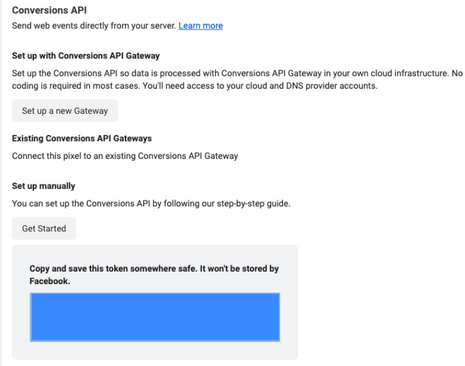 **Important:**\
Only users with **developer privileges** can generate tokens. Once generated, copy and store the token securely—it will only be shown once and expires in **60 days**.
We recommend creating a recurring calendar reminder to rotate tokens, until we roll out automated refresh support.
Reference: [Facebook Conversions API Docs](https://developers.facebook.com/docs/marketing-api/conversions-api/get-started/)
***
## Step 2: Determine the Event Trigger
Facebook conversion events can be fired from different parts of the funnel depending on campaign goals. Pingtree supports custom event triggers via postbacks, API events, and routing filters.
### Available Trigger Types
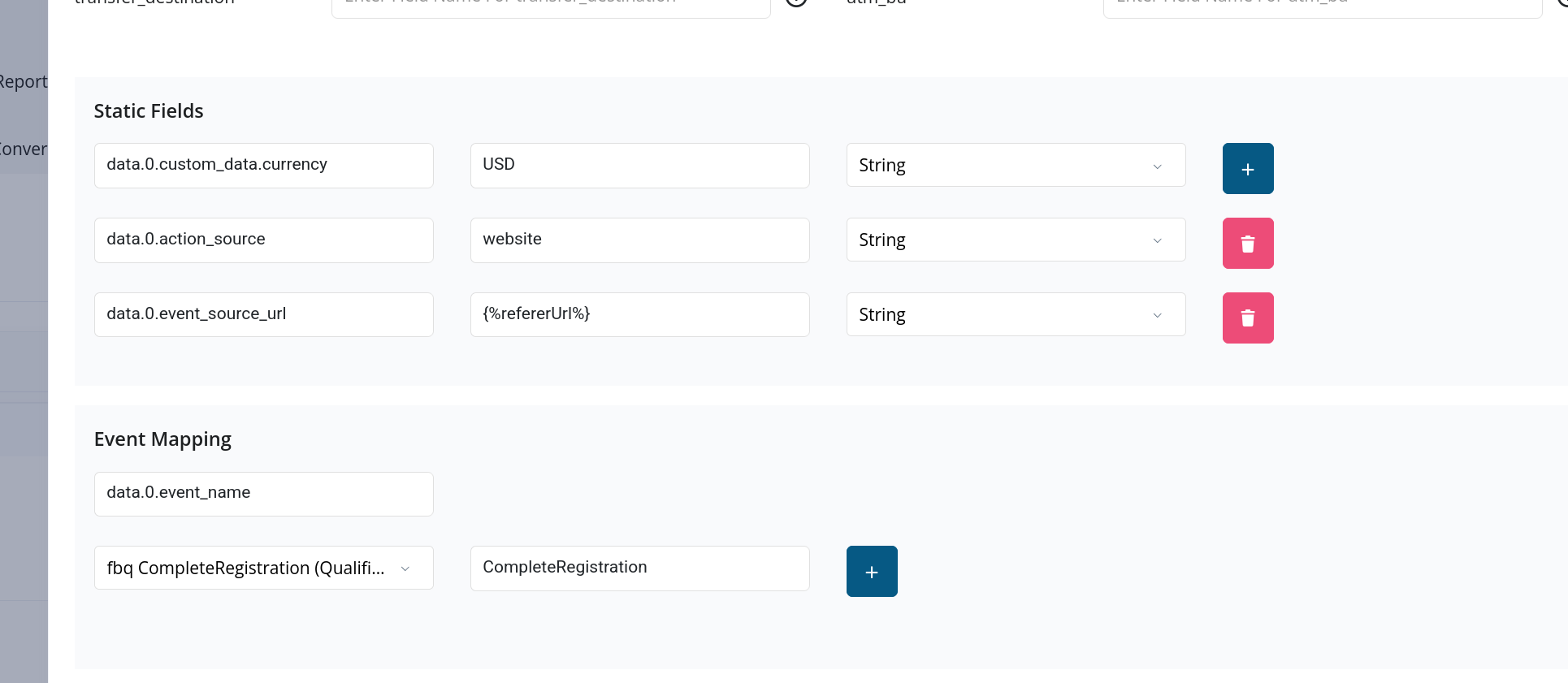
You can map any standard Facebook event name — or custom events created in your Business Manager — to any Pingtree event. Here are common trigger points:
| Trigger | When It Fires | Configure At |
| ----------------------------- | ------------------------------------ | ---------------------------------------------------------------- |
| **Form Submission** | User submits a form | Source > Postbacks > On Form Submit |
| **Lead Sold** | Lead is accepted and sold to a buyer | Distribution > Posting API |
| **Offer Wall Click** | User clicks on an offer | Source > Postbacks > On Offer Click |
| **Offer Wall Conversion** | User completes a third-party offer | Requires conversion pixel or S2S postback from the offer network |
| **Custom Buyer-Based Events** | Lead is routed to a specific buyer | Distribution > Routing Rules with event conditions |
> **Tip:** Buyer-based events let you fire different Facebook events depending on which buyer receives the lead. This is useful for A/B testing ad optimization across different buyer segments.
**Important:**\
Only users with **developer privileges** can generate tokens. Once generated, copy and store the token securely—it will only be shown once and expires in **60 days**.
We recommend creating a recurring calendar reminder to rotate tokens, until we roll out automated refresh support.
Reference: [Facebook Conversions API Docs](https://developers.facebook.com/docs/marketing-api/conversions-api/get-started/)
***
## Step 2: Determine the Event Trigger
Facebook conversion events can be fired from different parts of the funnel depending on campaign goals. Pingtree supports custom event triggers via postbacks, API events, and routing filters.
### Available Trigger Types
You can map any standard Facebook event name — or custom events created in your Business Manager — to any Pingtree event. Here are common trigger points:
| Trigger | When It Fires | Configure At |
| ----------------------------- | ------------------------------------ | ---------------------------------------------------------------- |
| **Form Submission** | User submits a form | Source > Postbacks > On Form Submit |
| **Lead Sold** | Lead is accepted and sold to a buyer | Distribution > Posting API |
| **Offer Wall Click** | User clicks on an offer | Source > Postbacks > On Offer Click |
| **Offer Wall Conversion** | User completes a third-party offer | Requires conversion pixel or S2S postback from the offer network |
| **Custom Buyer-Based Events** | Lead is routed to a specific buyer | Distribution > Routing Rules with event conditions |
> **Tip:** Buyer-based events let you fire different Facebook events depending on which buyer receives the lead. This is useful for A/B testing ad optimization across different buyer segments.
 ***
## Step 3: Send Events to Facebook
**Endpoint:**
```
POST https://graph.facebook.com/v25.0/{PIXEL_ID}/events
```
**Headers:**
```
Authorization: Bearer {ACCESS_TOKEN}
Content-Type: application/json
```
Replace `{PIXEL_ID}` and `{ACCESS_TOKEN}` with the appropriate values provided by the Business Manager.
***
## Required Fields and Hashed Data
Facebook requires all personally identifiable information (PII) to be SHA-256 hashed before being sent. Pingtree handles this automatically via data transformers.
### Pingtree Field → Facebook CAPI Mapping
| Pingtree Field | Facebook Field Key | JSON Path in Payload | Notes |
| ---------------------- | ----------------------- | ------------------------------------ | ---------------------------------------------------- |
| `email` | `em` | `data.0.user_data.em` | SHA-256 hashed |
| `mobile` | `ph` | `data.0.user_data.ph` | SHA-256 hashed |
| `first_name` | `fn` | `data.0.user_data.fn` | SHA-256 hashed (optional, improves match rate) |
| `last_name` | `ln` | `data.0.user_data.ln` | SHA-256 hashed (optional, improves match rate) |
| `facebook_fbp` | `fbp` | `data.0.user_data.fbp` | Helps with browser/session-level attribution |
| `facebook_fbc` | `fbc` | `data.0.user_data.fbc` | Captures original Facebook ad click via fbclid |
| `ip` | `client_ip_address` | `data.0.user_data.client_ip_address` | Required if user agent is missing |
| `user_agent` | `client_user_agent` | `data.0.user_data.client_user_agent` | Strongly recommended |
| `utc_timestamp` | `event_time` | `data.0.event_time` | UNIX timestamp in UTC |
| `event_name` | `event_name` | `data.0.event_name` | ex: `Lead`, `CompleteRegistration`, etc. |
| `custom_data.value` | `value` | `data.0.custom_data.value` | Revenue or sale amount |
| `custom_data.currency` | `currency` | `data.0.custom_data.currency` | Usually `"USD"` |
| *(static or dynamic)* | `action_source` | `data.0.action_source` | Typically `"web"` |
| `fbclid` | *(used to build `fbc`)* | `data.0.user.fbclid` | Used if `facebook_fbc` not directly available |
| `test_event_code` | `test_event_code` | `data.0.test_event_code` | **Used for testing only** — Do not use in production |
## Use these mappings to ensure accurate event payloads and maximize match rates across Facebook Ads.
## Sample Payload
```json theme={null}
{
"data": [
{
"event_name": "CompleteRegistration",
"event_time": 1655321234,
"action_source": "web",
"user_data": {
"em": "c3fcd3d76192e4007dfb496cca67e13b",
"ph": "b7c3d3d131bde4123ac85b9e6807631f",
"fbp": "fb.1.1621245218912.1234567890",
"fbc": "fb.1.1621245218912.AbCdEfGhIjKlMnOpQrStUvWxYz"
},
"custom_data": {
"value": 50.0,
"currency": "USD"
}
}
]
}
```
***
## Attribution Accuracy Tips
* Always include `fbp` and `fbc` if available.
* Use real event timestamps in UTC to avoid time drift issues.
* Don’t reuse old tokens — Facebook will silently reject or downrank expired tokens.
* Consider hashing additional identifiers (first name, last name, IP) to improve matching.
***
## FAQ
**Do I need extra consent to send hashed PII to Facebook?**
If you already display a consent disclosure or cookie banner and your privacy policy references Facebook Ads, you are covered under standard CAPI usage. Hashing PII before transmission complies with Facebook’s terms.
**Can I send multiple events per session?**
Yes. Pingtree supports triggering multiple events (e.g., form submit, sale, upsell) in sequence. Each event can be tied to routing logic or source filters.
**What if I want to suppress Facebook events for specific buyers?**
Pingtree supports conditional filtering at the buyer or source level. You can define postback conditions per route or event type.
***
## Troubleshooting
To test your server-side events with Facebook, retrieve a `test_event_code` from your Meta Events Manager:
1. In Meta Events Manager, locate the pixel you're using and copy the `test_event_code`.
2. Go to your **Postback Setup** in Pingtree (Source or Distribution).
3. Scroll to the bottom and create a new **Static Field**:
* **Key**: `test_event_code`
* **Value**: the code you copied.
Once saved, use the **Test Postback** tool at the top of the Postback Settings page.
### Testing Guidelines
* Use a `transaction_id` tied to a real ad-clicked lead whenever possible.
* If unavailable, construct the payload manually using known test data.
* Use a SHA-256 hashing tool to hash sensitive fields like `email` and `phone`.
* Use a current UNIX timestamp from [epochconverter.com](https://www.epochconverter.com/) for the `event_time` field.
***
For implementation help, contact your account manager or reach out via **Live Support** in the Pingtree app.
***
## Step 3: Send Events to Facebook
**Endpoint:**
```
POST https://graph.facebook.com/v25.0/{PIXEL_ID}/events
```
**Headers:**
```
Authorization: Bearer {ACCESS_TOKEN}
Content-Type: application/json
```
Replace `{PIXEL_ID}` and `{ACCESS_TOKEN}` with the appropriate values provided by the Business Manager.
***
## Required Fields and Hashed Data
Facebook requires all personally identifiable information (PII) to be SHA-256 hashed before being sent. Pingtree handles this automatically via data transformers.
### Pingtree Field → Facebook CAPI Mapping
| Pingtree Field | Facebook Field Key | JSON Path in Payload | Notes |
| ---------------------- | ----------------------- | ------------------------------------ | ---------------------------------------------------- |
| `email` | `em` | `data.0.user_data.em` | SHA-256 hashed |
| `mobile` | `ph` | `data.0.user_data.ph` | SHA-256 hashed |
| `first_name` | `fn` | `data.0.user_data.fn` | SHA-256 hashed (optional, improves match rate) |
| `last_name` | `ln` | `data.0.user_data.ln` | SHA-256 hashed (optional, improves match rate) |
| `facebook_fbp` | `fbp` | `data.0.user_data.fbp` | Helps with browser/session-level attribution |
| `facebook_fbc` | `fbc` | `data.0.user_data.fbc` | Captures original Facebook ad click via fbclid |
| `ip` | `client_ip_address` | `data.0.user_data.client_ip_address` | Required if user agent is missing |
| `user_agent` | `client_user_agent` | `data.0.user_data.client_user_agent` | Strongly recommended |
| `utc_timestamp` | `event_time` | `data.0.event_time` | UNIX timestamp in UTC |
| `event_name` | `event_name` | `data.0.event_name` | ex: `Lead`, `CompleteRegistration`, etc. |
| `custom_data.value` | `value` | `data.0.custom_data.value` | Revenue or sale amount |
| `custom_data.currency` | `currency` | `data.0.custom_data.currency` | Usually `"USD"` |
| *(static or dynamic)* | `action_source` | `data.0.action_source` | Typically `"web"` |
| `fbclid` | *(used to build `fbc`)* | `data.0.user.fbclid` | Used if `facebook_fbc` not directly available |
| `test_event_code` | `test_event_code` | `data.0.test_event_code` | **Used for testing only** — Do not use in production |
## Use these mappings to ensure accurate event payloads and maximize match rates across Facebook Ads.
## Sample Payload
```json theme={null}
{
"data": [
{
"event_name": "CompleteRegistration",
"event_time": 1655321234,
"action_source": "web",
"user_data": {
"em": "c3fcd3d76192e4007dfb496cca67e13b",
"ph": "b7c3d3d131bde4123ac85b9e6807631f",
"fbp": "fb.1.1621245218912.1234567890",
"fbc": "fb.1.1621245218912.AbCdEfGhIjKlMnOpQrStUvWxYz"
},
"custom_data": {
"value": 50.0,
"currency": "USD"
}
}
]
}
```
***
## Attribution Accuracy Tips
* Always include `fbp` and `fbc` if available.
* Use real event timestamps in UTC to avoid time drift issues.
* Don’t reuse old tokens — Facebook will silently reject or downrank expired tokens.
* Consider hashing additional identifiers (first name, last name, IP) to improve matching.
***
## FAQ
**Do I need extra consent to send hashed PII to Facebook?**
If you already display a consent disclosure or cookie banner and your privacy policy references Facebook Ads, you are covered under standard CAPI usage. Hashing PII before transmission complies with Facebook’s terms.
**Can I send multiple events per session?**
Yes. Pingtree supports triggering multiple events (e.g., form submit, sale, upsell) in sequence. Each event can be tied to routing logic or source filters.
**What if I want to suppress Facebook events for specific buyers?**
Pingtree supports conditional filtering at the buyer or source level. You can define postback conditions per route or event type.
***
## Troubleshooting
To test your server-side events with Facebook, retrieve a `test_event_code` from your Meta Events Manager:
1. In Meta Events Manager, locate the pixel you're using and copy the `test_event_code`.
2. Go to your **Postback Setup** in Pingtree (Source or Distribution).
3. Scroll to the bottom and create a new **Static Field**:
* **Key**: `test_event_code`
* **Value**: the code you copied.
Once saved, use the **Test Postback** tool at the top of the Postback Settings page.
### Testing Guidelines
* Use a `transaction_id` tied to a real ad-clicked lead whenever possible.
* If unavailable, construct the payload manually using known test data.
* Use a SHA-256 hashing tool to hash sensitive fields like `email` and `phone`.
* Use a current UNIX timestamp from [epochconverter.com](https://www.epochconverter.com/) for the `event_time` field.
***
For implementation help, contact your account manager or reach out via **Live Support** in the Pingtree app.