> ## Documentation Index
> Fetch the complete documentation index at: https://docs.pingtree.com/llms.txt
> Use this file to discover all available pages before exploring further.
# Traffic Distribution
> Configure how traffic is routed across multiple landing pages and form flows using percentage-based distribution in the Funnel Builder.
The **Traffic Distribution** feature allows you to control how incoming traffic is split between multiple landing pages and form flows within a funnel. This helps optimize performance, run A/B tests, manage load, and direct visitors strategically.
***
## Landing Page Routing
### What Is Landing Page Routing?
Landing Page Routing allows you to distribute incoming traffic between multiple landing pages by setting custom percentage splits. You can send users to internal system-hosted pages or to external URLs.
 ***
### How to Set Up Landing Page Routing
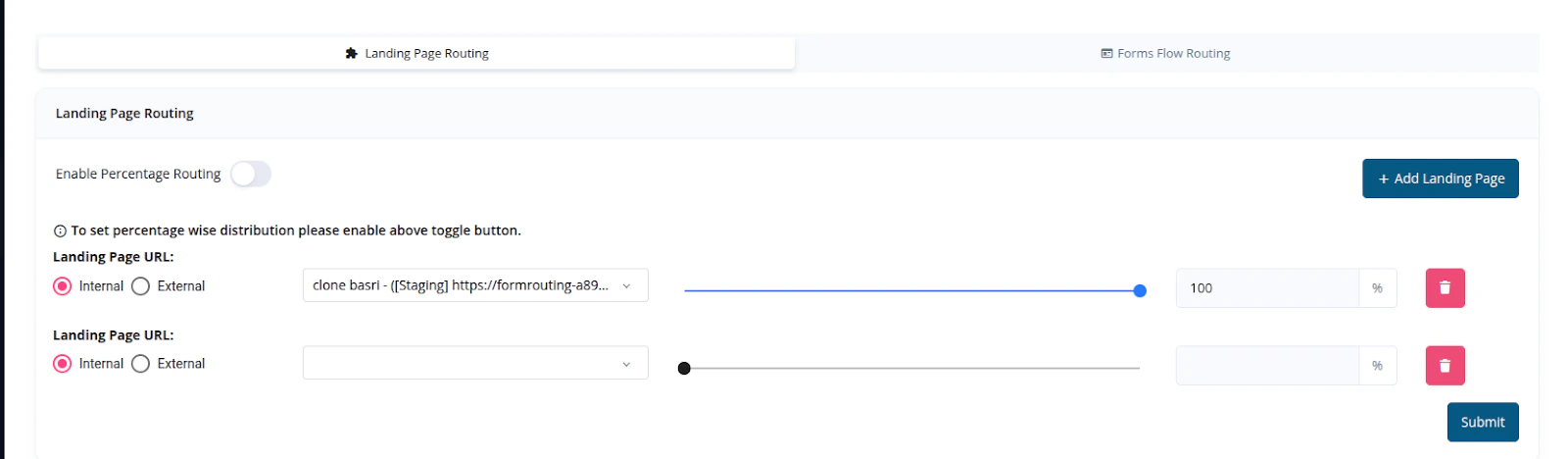
Click **+ Add Landing Page** to create a new entry.\
You will be prompted to provide:
* **Landing Page URL** – The destination URL for this route.
* **Internal or External** – Choose whether the page is hosted inside the system or externally.
Toggle **Enable Percentage Routing** to turn on traffic distribution controls.
Use the percentage **slider** to assign a portion of traffic to each landing page.\
Example:
* Landing Page A: 70%
* Landing Page B: 30%\
These values determine what fraction of users get routed to each page.
Once percentages are assigned, click **Submit** to save your routing rules.
***
### Example
If you configure:
* **Landing Page 1** – 70%
* **Landing Page 2** – 30%
Pingtree will automatically route **70%** of funnel visitors to **Landing Page 1** and **30%** to **Landing Page 2**.
***
### Key Features
* **Controlled Traffic Distribution** – Route visitors across pages based on strategy or capacity.
* **Internal or External Pages** – Support for hosted pages and third-party URLs.
* **Simple UI** – Adjust sliders to balance percentages quickly.
***
## Form Flow Routing
### What Is Form Flow Routing?
Form Flow Routing controls how traffic is distributed between multiple **Form Flows** after a user reaches the landing page. Like landing page routing, you can define a percentage-based split or use round robin logic.
***
### Routing Configuration
***
### How to Set Up Landing Page Routing
Click **+ Add Landing Page** to create a new entry.\
You will be prompted to provide:
* **Landing Page URL** – The destination URL for this route.
* **Internal or External** – Choose whether the page is hosted inside the system or externally.
Toggle **Enable Percentage Routing** to turn on traffic distribution controls.
Use the percentage **slider** to assign a portion of traffic to each landing page.\
Example:
* Landing Page A: 70%
* Landing Page B: 30%\
These values determine what fraction of users get routed to each page.
Once percentages are assigned, click **Submit** to save your routing rules.
***
### Example
If you configure:
* **Landing Page 1** – 70%
* **Landing Page 2** – 30%
Pingtree will automatically route **70%** of funnel visitors to **Landing Page 1** and **30%** to **Landing Page 2**.
***
### Key Features
* **Controlled Traffic Distribution** – Route visitors across pages based on strategy or capacity.
* **Internal or External Pages** – Support for hosted pages and third-party URLs.
* **Simple UI** – Adjust sliders to balance percentages quickly.
***
## Form Flow Routing
### What Is Form Flow Routing?
Form Flow Routing controls how traffic is distributed between multiple **Form Flows** after a user reaches the landing page. Like landing page routing, you can define a percentage-based split or use round robin logic.
***
### Routing Configuration
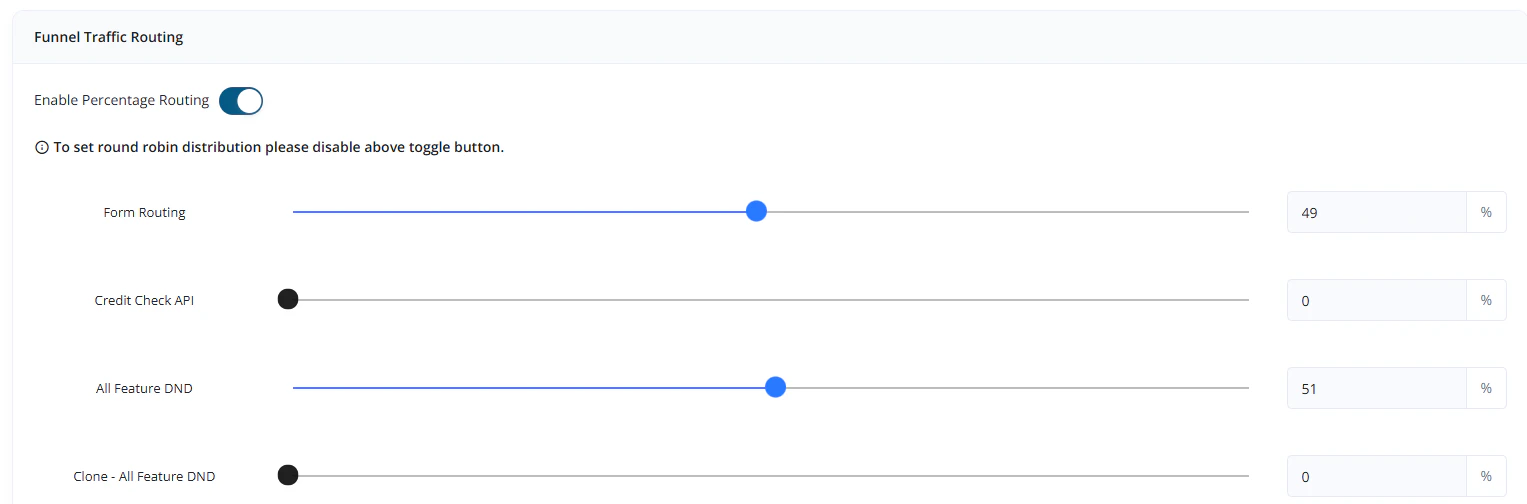 **Enable Percentage Routing**:\
When toggled ON, traffic will be divided based on the percentage settings.
**Disable Percentage Routing**:\
Traffic will be routed using **Round Robin** logic, sending users sequentially through available form flows.
> Example:\
> If you define two form flows with percentages:
>
> * Form Flow A: 49%
> * Form Flow B: 51%\
> All other flows not assigned a percentage will remain inactive.
***
### Summary
Traffic Distribution in Pingtree’s Funnel Builder helps optimize and test your landing pages and form flows. By combining Landing Page Routing and Form Flow Routing, you can direct traffic where it matters most, ensuring better performance and higher conversion.
**Enable Percentage Routing**:\
When toggled ON, traffic will be divided based on the percentage settings.
**Disable Percentage Routing**:\
Traffic will be routed using **Round Robin** logic, sending users sequentially through available form flows.
> Example:\
> If you define two form flows with percentages:
>
> * Form Flow A: 49%
> * Form Flow B: 51%\
> All other flows not assigned a percentage will remain inactive.
***
### Summary
Traffic Distribution in Pingtree’s Funnel Builder helps optimize and test your landing pages and form flows. By combining Landing Page Routing and Form Flow Routing, you can direct traffic where it matters most, ensuring better performance and higher conversion.