> ## Documentation Index
> Fetch the complete documentation index at: https://docs.pingtree.com/llms.txt
> Use this file to discover all available pages before exploring further.
# Fraud Detection
> Enable fraud detection to assess leads based on IP reputation, user agent behavior, and fraud scoring to block low-quality or suspicious entries.
Fraud Detection helps identify and block potentially fraudulent leads by evaluating IP addresses, user agent signatures, and other device metadata.
## Source-Level Fraud Detection
**Configuration Path:**\
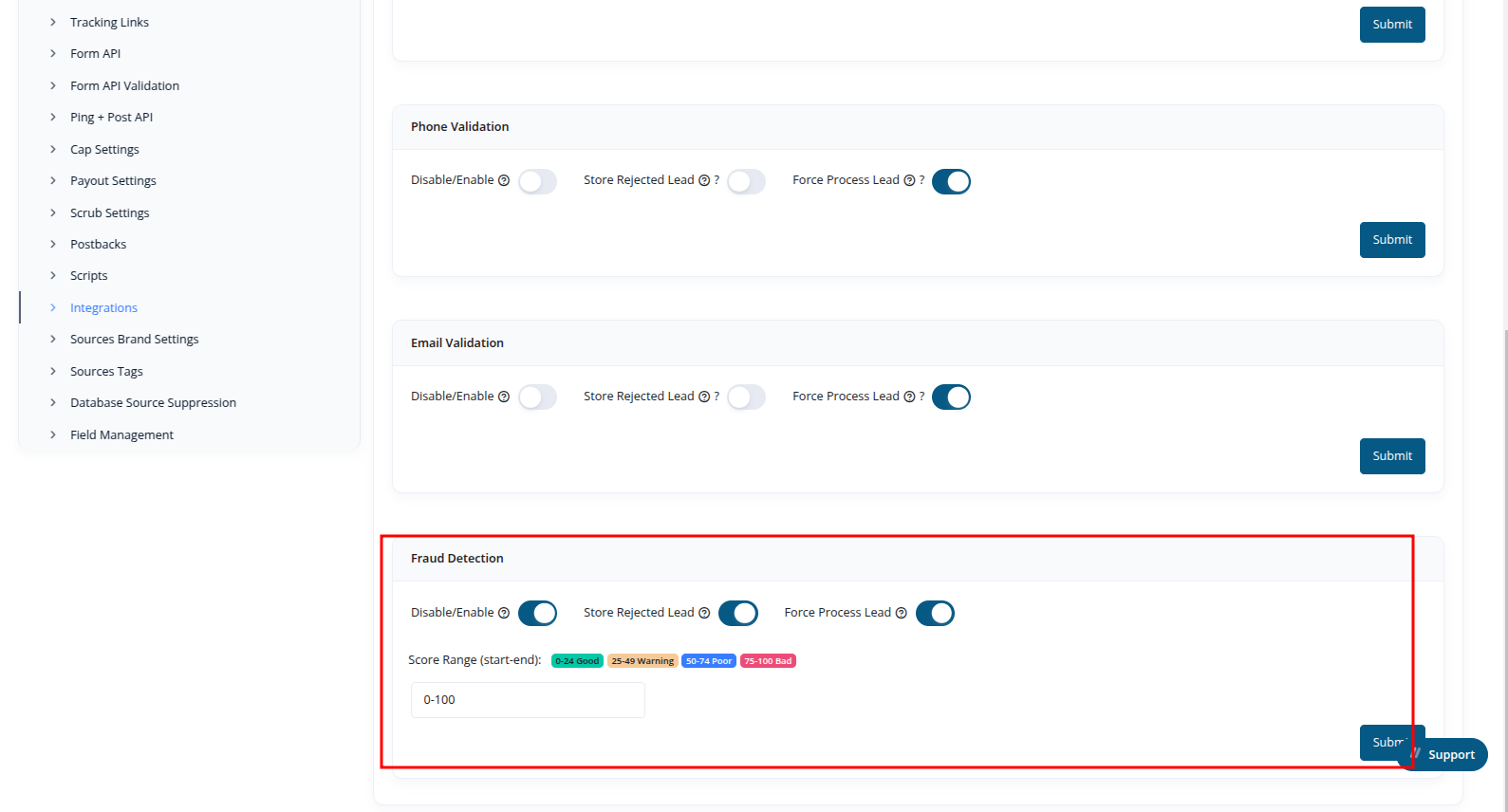
`Sources > Single View > Integrations Tab > Fraud Detection`
 ### Functionality:
* Enable the **Fraud Detection** toggle to activate fraud scoring on leads submitted through the **Lead Form API**, **Ping API**, and **Post API**.
* Define a **fraud score range**. Leads whose score falls within this range will be automatically rejected and **not stored**.
* You may optionally:
* Enable **Store Rejected Lead**: This stores leads even if they're flagged as fraudulent.
* Enable **Force Process Lead**: Processes and distributes the lead despite its fraud score classification.
### Fraud Score Classifications:
| Score Range | Classification |
| ----------- | -------------- |
| 0–24 | Good |
| 25–49 | Warning |
| 50–74 | Poor |
| 75–100 | Bad |
> **Tip:** Use score-based rejection to optimize quality and reduce invalid lead risk.
***
## Funnel Form Flow Step-Level Fraud Detection
**Configuration Path:**\
`Campaign > Funnel Builder > Form Flows > [Step] > Settings Sub-tab > Check Fraud Detection`
### Functionality:
* Enable the **Fraud Detection** toggle to activate fraud scoring on leads submitted through the **Lead Form API**, **Ping API**, and **Post API**.
* Define a **fraud score range**. Leads whose score falls within this range will be automatically rejected and **not stored**.
* You may optionally:
* Enable **Store Rejected Lead**: This stores leads even if they're flagged as fraudulent.
* Enable **Force Process Lead**: Processes and distributes the lead despite its fraud score classification.
### Fraud Score Classifications:
| Score Range | Classification |
| ----------- | -------------- |
| 0–24 | Good |
| 25–49 | Warning |
| 50–74 | Poor |
| 75–100 | Bad |
> **Tip:** Use score-based rejection to optimize quality and reduce invalid lead risk.
***
## Funnel Form Flow Step-Level Fraud Detection
**Configuration Path:**\
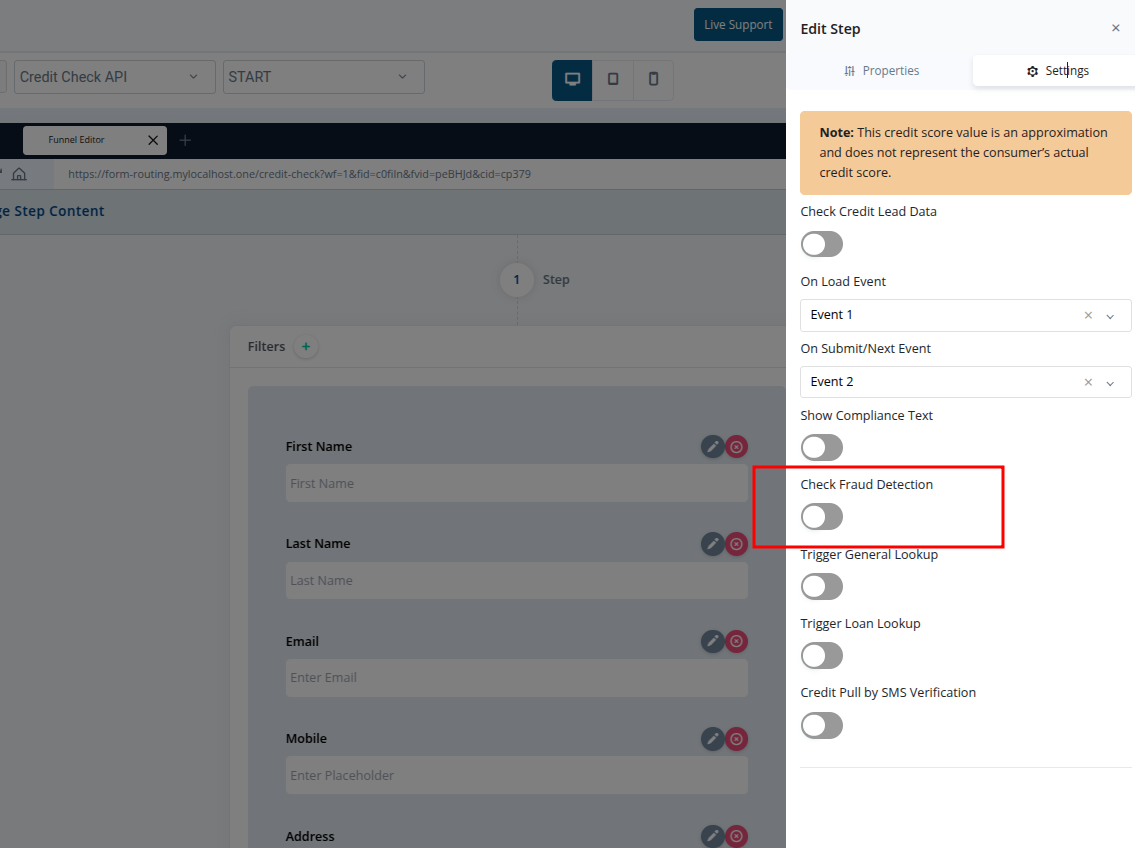
`Campaign > Funnel Builder > Form Flows > [Step] > Settings Sub-tab > Check Fraud Detection`
 ### Functionality:
* Enable the **Check Fraud Detection** toggle on a specific step.
* This triggers fraud scoring logic on the form flow, leveraging source-linked configuration.
* The following values are stored in the lead record for each submission:
* `fraud_score`: Numeric value (0–100)
* `fraud_class`: Score classification label (Good, Warning, Poor, Bad)
***
> **Note:** Funnel-level fraud detection honors the source’s fraud configuration, but allows step-specific enforcement within the lead journey.
### Functionality:
* Enable the **Check Fraud Detection** toggle on a specific step.
* This triggers fraud scoring logic on the form flow, leveraging source-linked configuration.
* The following values are stored in the lead record for each submission:
* `fraud_score`: Numeric value (0–100)
* `fraud_class`: Score classification label (Good, Warning, Poor, Bad)
***
> **Note:** Funnel-level fraud detection honors the source’s fraud configuration, but allows step-specific enforcement within the lead journey.