> ## Documentation Index
> Fetch the complete documentation index at: https://docs.pingtree.com/llms.txt
> Use this file to discover all available pages before exploring further.
# Loan Lookup API
> Enable loan data prefill in funnel flows using Pingtree’s API or your internal source. Pre-populates fields like income, employer, credit score, etc.
The **Loan Lookup API** integration allows you to **pre-fill form fields** with loan-related data based on user-submitted information. This improves form completion rates and user experience by reducing manual input.
***
## Funnel Form Flow Step-Level Configuration
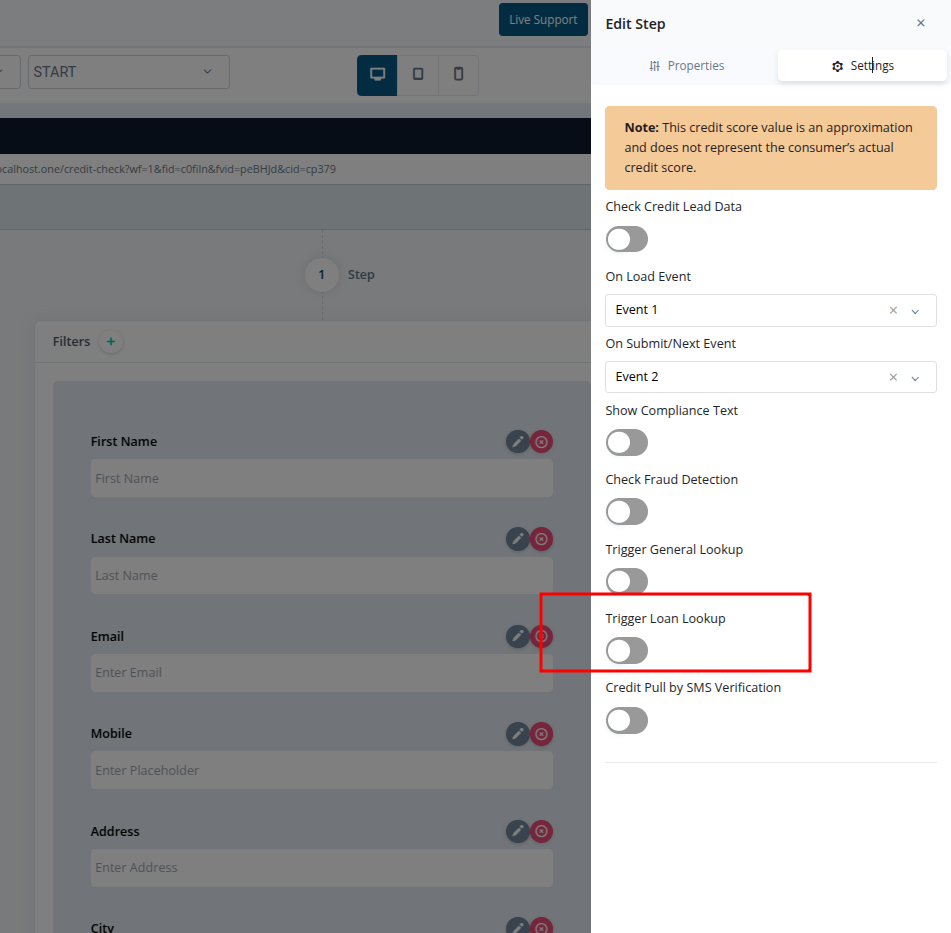
**Configuration Path:**\
`Form Flow > Step > Settings > Trigger Loan Lookup`
 ### Functionality
* Toggle **Trigger Loan Lookup** ON for a specific step.
* The system will call the Loan Lookup API at that step.
* **All subsequent steps** in the form will be automatically **pre-filled** with any data returned from the lookup.
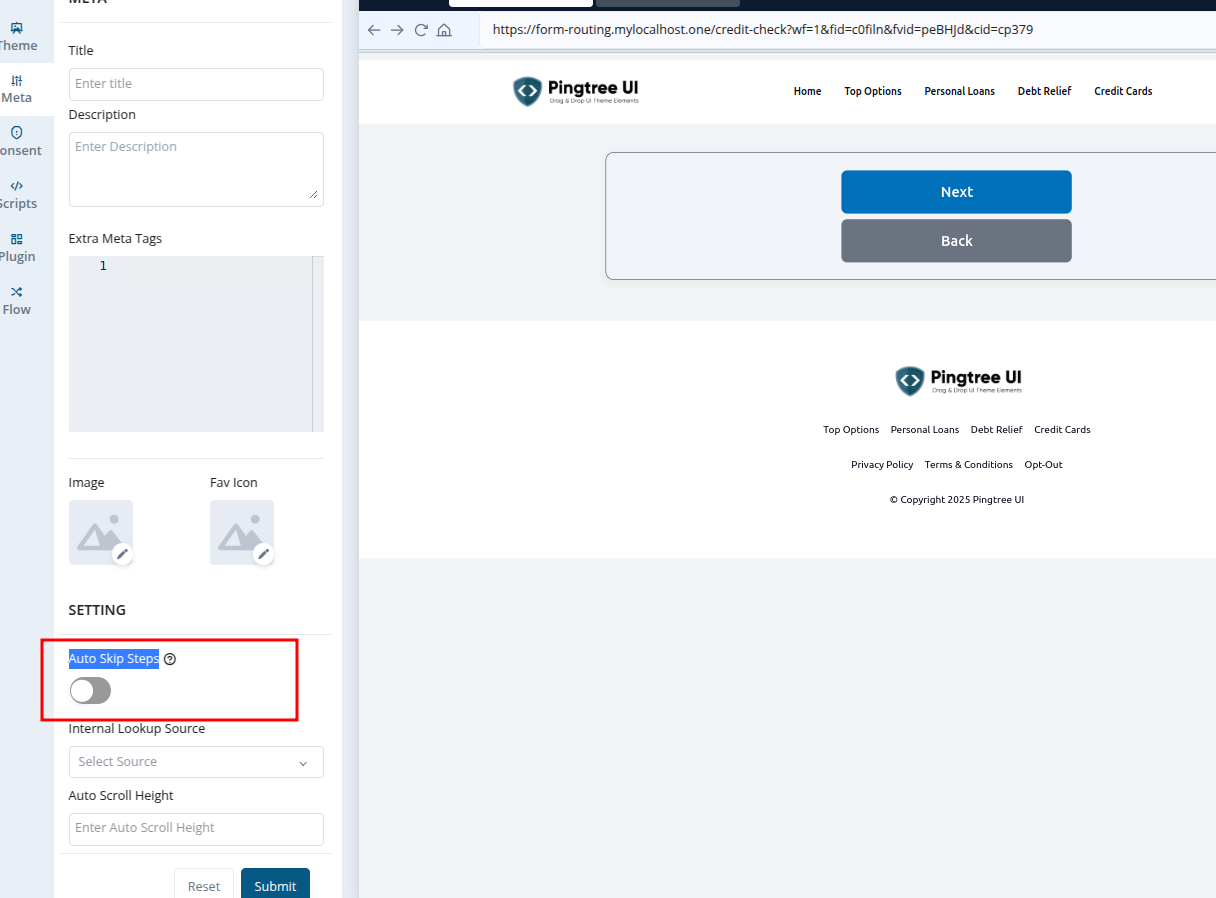
* **Note:** Steps are **not skipped** by default. To enable step skipping based on filled data, toggle on **Auto Skip Steps** in the **Meta tab** of the form flow.
***
## Internal Lookup Source (Custom Integration)
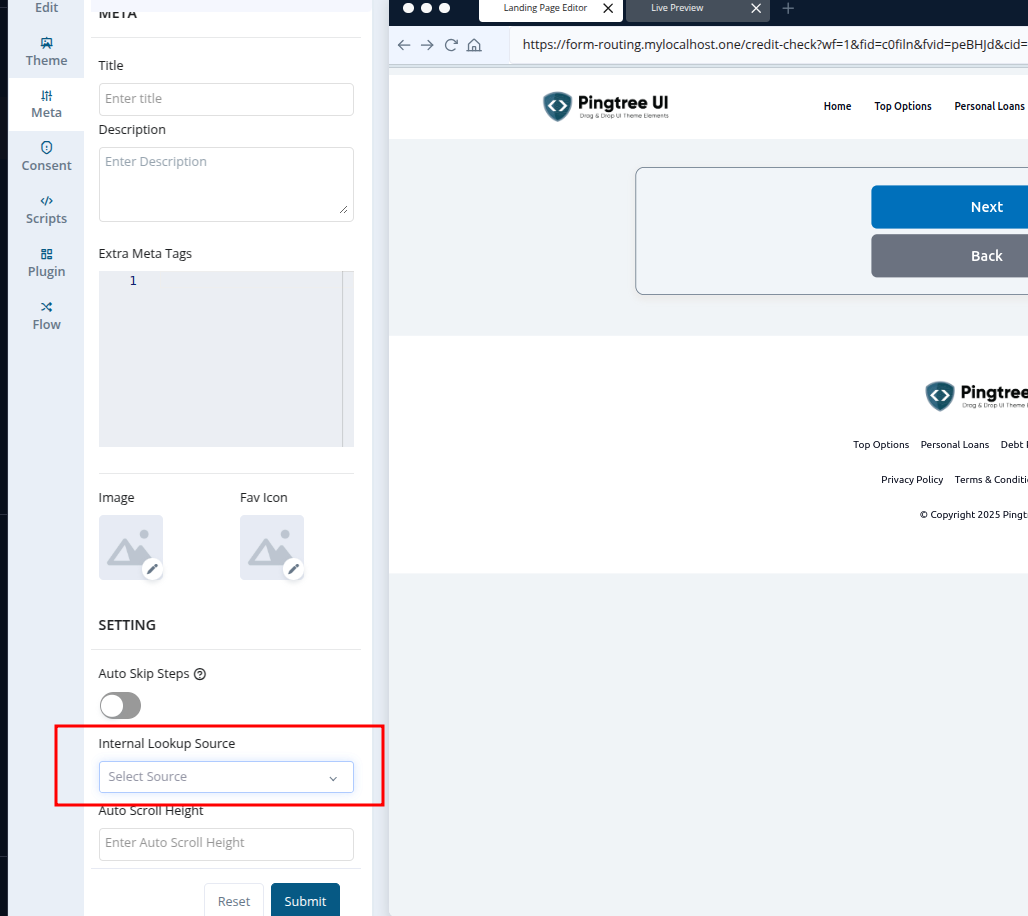
**Configuration Path:**\
`Form Flow > Meta Tab > Internal Lookup Source`
### Functionality
* Toggle **Trigger Loan Lookup** ON for a specific step.
* The system will call the Loan Lookup API at that step.
* **All subsequent steps** in the form will be automatically **pre-filled** with any data returned from the lookup.
* **Note:** Steps are **not skipped** by default. To enable step skipping based on filled data, toggle on **Auto Skip Steps** in the **Meta tab** of the form flow.
***
## Internal Lookup Source (Custom Integration)
**Configuration Path:**\
`Form Flow > Meta Tab > Internal Lookup Source`
 ### Functionality
* Select your internal source from the dropdown.
* When enabled, Pingtree will:
1. First check its **own Loan Lookup API**
2. Then check your **internal source** if no data is found
* Step skipping behavior is the same: to skip steps based on prefill, enable **Auto Skip Steps** in the Meta tab.
### Customization Options (Contact Support to Configure):
* Only check **Pingtree API**
* Only check **your internal lookup**
* First check **internal source**, then fallback to **Pingtree API**
***
## Data Storage
Once lookup is triggered, the field `loan_lookup` will be stored in the lead record:
* `loan_lookup: true` — if lookup was triggered and returned data
* `loan_lookup: false` — if no data was returned or lookup was not triggered
***
## Fields Used for Lookup
The API uses the following lead fields to perform a lookup:
* `first_name`
* `email`
* `mobile`
***
## Fields Populated (if matched)
If data is found, the following fields are auto-populated:
* `first_name`
* `last_name`
* `email`
* `mobile`
* `address`
* `city`
* `state`
* `zip_code`
* `country`
* `net_monthly_income`
* `employer_name`
* `job_title`
* `months_at_employer`
* `credit_score`
* `home_owner`
* `months_at_address`
* `user_agent`
* `ip`
* `isp`
* `preferred_contact_tod_name`
***
## Internal Lookup Data
If using your **Internal Source**, it will use:
* `email` and `mobile` fields
And will pre-fill any fields returned in your response (must match Pingtree form field keys).
> **Tip:** Combine loan lookup with credit scoring or fraud detection for a more robust lead validation pipeline.
### Functionality
* Select your internal source from the dropdown.
* When enabled, Pingtree will:
1. First check its **own Loan Lookup API**
2. Then check your **internal source** if no data is found
* Step skipping behavior is the same: to skip steps based on prefill, enable **Auto Skip Steps** in the Meta tab.
### Customization Options (Contact Support to Configure):
* Only check **Pingtree API**
* Only check **your internal lookup**
* First check **internal source**, then fallback to **Pingtree API**
***
## Data Storage
Once lookup is triggered, the field `loan_lookup` will be stored in the lead record:
* `loan_lookup: true` — if lookup was triggered and returned data
* `loan_lookup: false` — if no data was returned or lookup was not triggered
***
## Fields Used for Lookup
The API uses the following lead fields to perform a lookup:
* `first_name`
* `email`
* `mobile`
***
## Fields Populated (if matched)
If data is found, the following fields are auto-populated:
* `first_name`
* `last_name`
* `email`
* `mobile`
* `address`
* `city`
* `state`
* `zip_code`
* `country`
* `net_monthly_income`
* `employer_name`
* `job_title`
* `months_at_employer`
* `credit_score`
* `home_owner`
* `months_at_address`
* `user_agent`
* `ip`
* `isp`
* `preferred_contact_tod_name`
***
## Internal Lookup Data
If using your **Internal Source**, it will use:
* `email` and `mobile` fields
And will pre-fill any fields returned in your response (must match Pingtree form field keys).
> **Tip:** Combine loan lookup with credit scoring or fraud detection for a more robust lead validation pipeline.